
How to Build a Real Estate Lead Magnet Funnel in HighLevel AI Studio
Getting real estate leads is one thing. Making sure those leads receive the right information, stay engaged, and hear from you long after they sign up is where the real work begins.
One practical way to bring all of this together is with a lead magnet funnel. You offer something useful, such as a local home buyer guide, collect the prospect’s contact information, deliver the guide, and follow up automatically.
With HighLevel AI Studio, you can use AI to create the guide and landing page, then connect everything to a workflow that handles delivery and long term nurturing.
Here is how to build the system, from creating your lead magnet to testing your automated follow up.

1. Create Your Real Estate Lead Magnet Before Running Ads
Before you spend money on advertising or create content to attract leads, decide what you want to offer them.
I see agents get excited about running ads or creating social media content before they have a clear destination for those leads. If someone clicks your ad, where are you sending them? What are they supposed to do next?
Start with the offer.
For this example, a local home buyer guide for Rio Verde Foothills, Arizona, provides useful information to people considering a move to the area.
Your guide could cover:
What buyers should know about the local community
The advantages and disadvantages of living in the area
Important property considerations, including local water concerns
Helpful information about buying a home in the neighborhood
A button to begin searching for available homes
A button to find out what a homeowner’s property might be worth
Your contact information so readers know how to reach you
The goal is to create something that answers real questions and gives people a reason to share their contact information.
Use ChatGPT and HighLevel AI Studio to Create the Guide

You do not have to write every page yourself.
You can use ChatGPT to develop a detailed prompt for your guide, then copy that prompt into AI Studio inside your HighLevel account.
Be specific about the purpose of the guide, the target audience, the location, the information to include, and the actions you want readers to take. For example, you might request an eight page local buyer guide with photographs, contact information, and buttons for searching homes or checking a property's value.
AI can give you a useful starting point, but do not assume the first version is ready to publish.
Review the content carefully. Check local facts, correct outdated information, add details that matter to your market, and make sure your contact information is accurate.
One more thing about images: Replace generic images with your own local photographs whenever possible. Your pictures help make the guide feel personal, and using images you have permission to use helps you avoid copyright problems.
Edit the Guide and Publish It
Once AI Studio generates the guide, use the visual editor to make changes without having to regenerate the entire project.
You can select elements to edit text, replace images from your media library, and update buttons and links. This is also your opportunity to remove awkward AI wording and add your own personality.
Pay close attention to the buttons. If you promise readers a home search, send them to a page with listings for that specific area. If you offer a home valuation, direct them to the appropriate valuation page.
A generic website homepage is not always the best destination.
When the guide looks right, save your changes and publish it. You can use the published URL provided by AI Studio or connect a custom domain or subdomain. If you use a custom domain, follow the domain setup instructions and verify the required DNS records.
At this point, you have a lead magnet people can access online. Next, you need a way to collect their information.
2. Build a Landing Page That Captures Leads
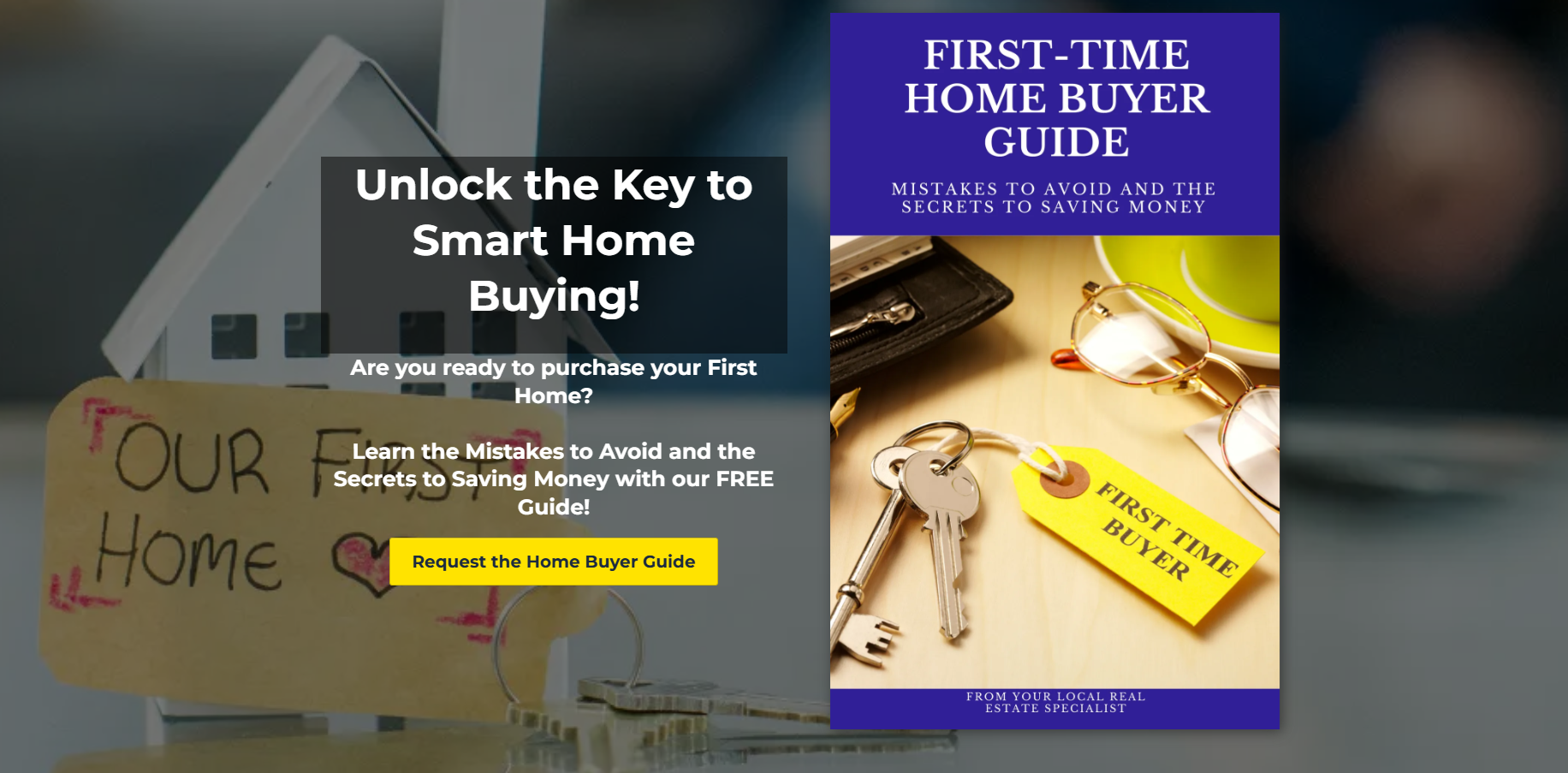
Your guide should provide value, but you also want to build a relationship with the people who request it.
That is where the opt in landing page comes in.
Instead of sending advertising traffic directly to the guide, create a landing page that explains what people will receive and gives them a simple way to request it.
Keep the Landing Page Simple
For a local buyer guide, you do not need a complicated website with several menus and dozens of links.
A straightforward landing page can include three main sections:
A clear offer: Explain what the guide covers and who will benefit from it.
A short opt in form: Ask for the information you need to deliver the guide.
A clear call to action: Tell visitors how to request their copy.
You can use AI Studio to create the page by prompting it to build a simple opt in landing page for your guide.
Review the form before publishing. At a minimum, collect a first name and email address. You can also ask for a last name and make the phone number optional.
Think about it from the prospect's perspective. Someone requesting a free neighborhood guide may be happy to provide an email address but not ready to share a phone number. Asking for more information than you need can create unnecessary friction.
If you do collect a phone number, make sure your text messaging practices and consent language comply with applicable laws and platform requirements.
Connect the Landing Page to Your Guide
After someone submits the form, the page should take them to the guide or another clearly explained next step.
AI Studio may configure the redirect automatically, but test it rather than assuming it works.
You also need to understand that forms created in AI Studio can behave differently from standard forms built in HighLevel's funnel or website builder.
That difference matters when you connect the form to your workflow. You cannot assume an existing standard form trigger will automatically recognize submissions from an AI Studio form.
Before building the automation, publish the landing page and submit a test entry. This helps you confirm that the form works and makes the submission available when configuring the workflow trigger.
Now you have the foundation: an offer, a landing page, and a way to capture contact information.
3. Connect the AI Studio Form to an Automated Workflow
This is where your lead magnet funnel starts doing more of the work for you.
A prospect might request your guide at 10 a.m. while you are available, or at 3 a.m. while you are sleeping. Either way, you want the guide delivered and the follow up started without relying on you to remember every step.
Set Up the Correct Form Trigger
Inside HighLevel, open Workflows and create or duplicate a buyer guide workflow.
If you already have a solid buyer nurture campaign, you do not need to start from scratch. Duplicate the existing workflow and customize it for the new guide.
In the workflow, add a new trigger and search for AI Studio Form
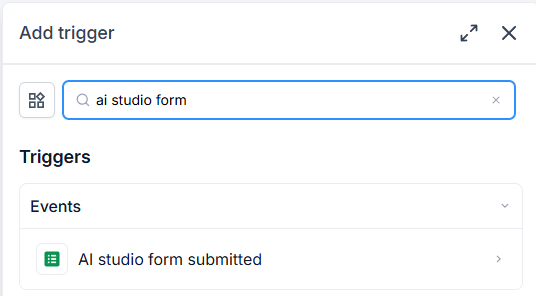
Submitted. Add a filter for the specific AI Studio form associated with your landing page.
If the form does not appear in the list, submit a test entry through the published landing page first. Then return to the workflow and check the available forms again.
Select the correct form and save the trigger.
This step tells HighLevel which form submission should start the campaign. Without the right trigger, your workflow may be beautifully written but never run.
Organize the New Contact
Once the trigger is in place, configure the workflow to keep your database organized.
Depending on your setup, useful actions may include:
Assigning the lead to the correct agent or team member
Sending an internal notification when someone requests the guide
Setting the contact type to buyer
Recording the lead source, such as Rio Verde Foothills Home Buyer Guide
Updating the appropriate status or pipeline information
If you work with a team or build systems for other agents, check the user assignment carefully. A new lead should not sit in the database without anyone responsible for following up.
Custom fields and custom values can also help you personalize your system.
A custom field stores information about the contact, such as their buyer status or lead source. A custom value stores reusable information about the business or campaign, such as an agent's service area or a guide URL.
For agencies managing multiple real estate clients, custom values can make templates easier to maintain. Each agent can update their own information without having to rewrite every message.
Set Appropriate Sending Hours
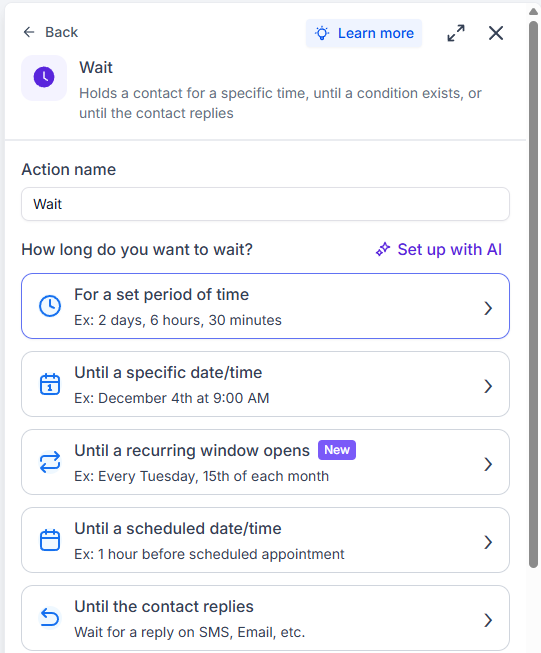
Automated messages should not catch people off guard in the middle of the night.
Configure your workflow's timing so text messages go out during appropriate hours. For example, if a prospect submits the form at 3 a.m., you can have the first text wait until your designated sending window begins.
Make sure your workflow's time zone and sending window match the audience you serve.
Emails and text messages do not always need identical timing, so review each step individually.
4. Deliver the Guide and Follow Up for the Long Term
Here is something real estate agents need to understand: requesting a guide does not necessarily mean someone is ready to buy a house today.
Some prospects are actively searching. Others are months away from making a move. Some are simply gathering information.
If you stop communicating after one email, you can easily lose the opportunity to build a relationship with someone who eventually becomes a client.
Deliver the Guide More Than One Way
The landing page redirect is helpful, but do not rely on it as the only delivery method.
Someone might close the page, get distracted, or forget where the guide went. Send an email with a clear subject line and a direct link to the actual guide.
You can also send a text message when the prospect has provided a number and the required consent is in place.
Keep the initial text useful and personal. Identify yourself, explain why you are contacting them, and let them know to check their inbox for the guide. If the email is not there, suggest checking the spam or promotions folder.
Avoid adding unnecessary links to that first text. The immediate goal is to help the prospect find the resource they requested.
Include appropriate opt out instructions and honor any request to stop receiving messages. Follow applicable messaging laws and carrier requirements.
Build a Campaign That Matches the Offer
Do not send every lead through the same generic buyer campaign.
Someone who requests a Rio Verde Foothills guide should receive information relevant to that area. Someone looking for homes near a college in Tempe needs a different experience.
The source of the lead and the offer they requested should influence the follow up.
For example:
A local buyer guide lead receives the guide, local information, and relevant property updates.
A first time buyer receives educational content about the buying process.
Someone requesting a home valuation receives information relevant to selling.
A person who saves a home or search receives follow up related to those listings or their search preferences.
The point is simple. Deliver what you promised, then continue the conversation in a way that makes sense for that person.
A year long nurture campaign can provide a useful starting point for real estate leads, as long as the content remains relevant and the frequency is appropriate. You can use a mix of educational emails, occasional check ins, helpful resources, and personal outreach.
Do not overwhelm people with messages just because the automation allows you to send them. The goal is to stay in touch, not become the reason someone unsubscribes.
Use Templates, Then Customize Them
Creating every email and text from scratch takes time. Build reusable templates for common messages, then customize them for each offer or location.
If you are an individual agent, you may prefer to edit the template directly with your guide link and local information.
If you are an agency owner building systems for multiple real estate clients, custom values can help personalize templates at scale.
Remember to check the subject line, greeting, message content, and button URL. A template that works for one neighborhood may not work for another.
When you modify an existing template that other workflows use, save your changes as a new template if you want to preserve the original. Otherwise, you could accidentally change messages in other campaigns.
Plan What Happens When the Campaign Ends
Long term follow up should not simply stop without a plan.
At the end of the campaign, you can apply a tag such as Buyer Campaign Ended. That gives you a way to identify contacts who have completed the sequence.
You can then review those leads and decide whether a re engagement campaign makes sense.
Some people may be ready to talk after a year. Others may need more time. Your database should help you identify opportunities for continued relationship building rather than leaving old leads forgotten.
5. Test the Entire Funnel Before Promoting It
Before you spend money on ads or send traffic to the landing page, test the complete process yourself.
A published page does not guarantee that every step of the automation is working correctly.
Use a test contact and walk through the funnel as if you were a potential buyer.
Check the following:
The landing page loads and displays correctly.
The form accepts the information and submits successfully.
The prospect is redirected to the correct guide.
The contact appears in HighLevel with the expected information.
The correct workflow starts when the AI Studio form is submitted.
The guide delivery email arrives with the correct subject line and working link.
The initial text follows your configured sending hours and consent requirements.
The lead is assigned correctly and receives the appropriate tags or contact fields.
The remaining follow up steps are published and configured correctly.
Read the actual messages you receive. Look for typos, outdated information, incorrect personalization, and broken links.
Testing your own funnel is one of the easiest ways to catch problems before a real prospect experiences them.
Once everything works, you can begin directing traffic to the landing page through your website, social content, or advertising campaigns. Track the results and improve the offer and follow up based on what you learn.
Your Lead Magnet Is Only the Beginning
Creating a real estate lead magnet is not just about producing a nice looking guide. It is about building a system that connects the offer, landing page, contact database, and follow up.
HighLevel AI Studio can help you get the guide and landing page created faster. Your workflow then helps deliver the resource, organize the lead, and keep the conversation going.
Start with one useful offer. Make sure the landing page works. Build the right follow up around that offer. Test everything before promoting it.
Once you have a working system, you can duplicate it for other neighborhoods, buyer resources, seller offers, and lead sources without rebuilding everything from scratch.
Want help building your real estate follow up system in HighLevel? Visit EngageMore PRO to learn more about the real estate CRM and follow up resources. You can also join the free HighLevel for Real Estate community to connect with others working on their real estate systems.
And if you are building your own funnel, ask yourself this: when someone requests your next guide, do you have a plan to keep in touch after you deliver it?
How to Build a Real Estate Lead Magnet Funnel in AI Studio HighLevel (Step-by-Step)